
Software Maintenance and Software Project Management
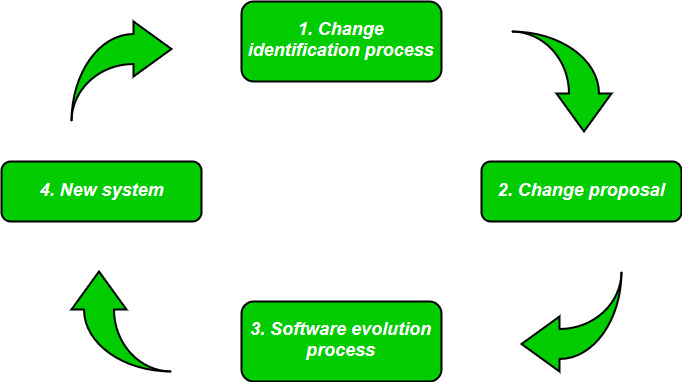
Software as an Evolutionary Entity
Software is not static. After delivery, it keeps changing over time due to:
- New user requirements
- Technology updates
- Bug fixes
- Legal and security changes
Hence, software evolves continuously, just like a living system.

Example: WhatsApp
- Initially: Only text messages
- Later: Voice calls, video calls, status, payments, communities
Key Points (Exam Ready)
- Software changes after delivery
- Maintenance is part of evolution
- Evolution increases software life
Need for Software Maintenance
| Reason | Explanation | Real-Life Example |
|---|---|---|
| Bug fixing | Errors found after release | App crashes on login |
| New requirements | User demands new features | Add dark mode |
| Environment change | OS / hardware update | Windows version upgrade |
| Performance improvement | Faster & better response | Reduce loading time |
| Security | Fix vulnerabilities | Patch hacking issues |
Software maintenance is required to keep the software correct, efficient, secure, and useful.
Categories of Software Maintenance
Corrective Maintenance
Fixing errors or bugs found after software delivery.
Example: Bank app crashes during fund transfer → developer fixes bug
Characteristics
- Reactive (done after problem occurs)
- Short-term solution
Preventive Maintenance
Changes made to prevent future problems.
Example: Refactoring old code to avoid future crashes
Characteristics
- Improves reliability
- Reduces future cost
Perfective Maintenance
Enhancing software by adding new features or improving performance.
Example: Adding UPI feature in a wallet app
Characteristics
- User-driven
- Improves usability
Comparison Table (Very Important for Exam)
| Type | Purpose | Example |
|---|---|---|
| Corrective | Fix errors | Bug fixing |
| Preventive | Avoid future issues | Code optimization |
| Perfective | Improve features | New module addition |
Cost of Software Maintenance
Key Fact
60–70% of total software cost is spent on maintenance.
Why Maintenance Cost is High?
- Poor documentation
- Complex code
- Frequent changes
- Old technology
Cost Distribution Table
| Activity | Approx. Cost |
|---|---|
| Corrective | 20% |
| Preventive | 25% |
| Perfective | 55% |
Maintenance cost increases as software becomes older and more complex.
Software Re-Engineering
Re-engineering is the process of modifying and improving existing software to make it easier to maintain and understand, without changing its functionality.
Activities in Re-Engineering
- Code restructuring
- Documentation update
- Database redesign
- Interface improvement
Real-Life Example: Old college ERP system upgraded with:
- Better UI
- Clean code
- Updated database
Advantages
- Extends software life
- Reduces maintenance cost
- Improves quality
Reverse Engineering
Reverse engineering means analyzing existing software to understand its design, code, and functionality, without using original documentation.
Simple Words: Understanding software by looking at its code
Real-Life Example
- Developer studies an old payroll system with no documents
- Extracts logic from code
Uses
- Recover lost documentation
- Understand legacy systems
- Support re-engineering
Difference: Reverse Engineering vs Re-Engineering (Very Important)
| Point | Reverse Engineering | Re-Engineering |
|---|---|---|
| Purpose | Understand software | Improve software |
| Output | Design & documentation | Better software |
| Code change | No | Yes |
| Stage | First step | Later step |
Relationship Between Reverse Engineering & Re-Engineering
Flow: Reverse Engineering ➜ Understanding ➜ Re-Engineering ➜ Improved Software
One-Page Exam Summary
- Software behaves as an evolutionary entity
- Maintenance keeps software usable
- Maintenance types: Corrective, Preventive, Perfective
- Maintenance cost is the largest cost
- Reverse engineering = understanding
- Re-engineering = improving
Software Configuration Management (SCM) Activities
Software Configuration Management is a systematic process to manage, control, and track changes in software throughout its life cycle.
It ensures that the right version of software is delivered to the customer.
Real-Life Example: Google Docs maintains:
- Different versions
- Change history
- Who modified what and when
Main SCM Activities
1. Configuration Identification
- Identifying items to be controlled
- Examples: source code, documents, test cases
2. Configuration Control
- Managing changes formally
- No change is allowed without approval
3. Configuration Status Accounting
- Recording and reporting changes
- Tracks current version and history
4. Configuration Auditing
- Verifying correctness of configuration
- Ensures changes are properly implemented
SCM Activities Table (Exam Friendly)
| Activity | Purpose | Example |
|---|---|---|
| Identification | Identify items | Source code files |
| Control | Approve changes | Change request |
| Status Accounting | Track changes | Version log |
| Auditing | Verify changes | Release check |
Change Control Process
Change Control is a formal procedure to manage changes in software so that unauthorized or unnecessary changes are avoided.
Why Change Control is Needed?
- Prevents chaos
- Maintains software quality
- Controls cost and schedule
Steps in Change Control Process
Step-by-Step Explanation
- Change Request: User or developer submits request
- Impact Analysis: Cost, time, and risk are analyzed
- Approval / Rejection: Change Control Board (CCB) decides
- Implementation: Approved change is developed
- Testing: Change is tested
- Release & Documentation: Updated version released
Real-Life Example
- Bank requests new KYC rule update
- Impact checked → approved → implemented → tested → released
Change Control Board (CCB)
| Member | Role |
|---|---|
| Project Manager | Final decision |
| Developer | Technical feasibility |
| QA Team | Quality impact |
| Client/User | Requirement clarity |
Software Version Control
Version Control is the process of managing multiple versions of software files.
It allows developers to:
- Track changes
- Restore old versions
- Work in teams safely
Why Version Control is Important?
| Reason | Benefit |
|---|---|
| Backup | Recover old versions |
| Teamwork | Multiple developers |
| History | Track who changed what |
| Stability | Avoid conflicts |
Types of Version Control
1. Centralized Version Control
- Single central repository
- Example: SVN
2. Distributed Version Control
- Each developer has full copy
- Example: Git
Comparison Table
| Feature | Centralized | Distributed |
|---|---|---|
| Repository | Single | Multiple |
| Speed | Slower | Faster |
| Failure risk | High | Low |
| Example | SVN | Git |
Real-Life Example
- GitHub stores all versions of a project
- Developers can rollback if error occurs
CASE Tools (Computer-Aided Software Engineering)
CASE tools are software tools that support and automate software development activities.
They increase productivity and reduce human errors.
Classification of CASE Tools
1. Upper CASE Tools
-
Support analysis and design phase
Examples:
- Data Flow Diagrams (DFD)
- UML tools
2. Lower CASE Tools
-
Support coding and testing phase
Examples:
- Code generators
- Debugging tools
3. Integrated CASE Tools
- Support entire SDLC
- Example: Rational Rose
CASE Tools Classification Table
| Type | SDLC Phase | Example |
|---|---|---|
| Upper CASE | Analysis & Design | UML tool |
| Lower CASE | Coding & Testing | Debugger |
| Integrated CASE | Full SDLC | Rational Rose |
Advantages of CASE Tools
- Faster development
- Better documentation
- Improved software quality
- Reduced development cost
Disadvantages
- High initial cost
- Training required
- Not suitable for small projects
Real-Life Example
- Using StarUML for designing diagrams
- Using Eclipse IDE for coding and testing
One-Page Exam Summary
- SCM manages and controls software changes
- Change Control ensures authorized modifications
- Version Control manages multiple software versions
- CASE tools automate SDLC activities
- Git is most popular version control system
Software Project Estimation
Software estimation is the process of predicting cost, effort, time, and resources required to develop a software project before development starts.
Why Estimation is Important?
- Proper planning
- Budget control
- Timely delivery
- Risk reduction
Real-Life Example
Before building an online shopping website, the company estimates:
- How many developers needed
- How much time required
- Total project cost
Estimation of Various Parameters
Cost Estimation
Cost estimation calculates total money required for:
- Developers’ salary
- Hardware & software
- Training
- Maintenance
Simple Formula
Cost = Effort × Cost per Person-Month
Example
If effort = 20 person-months
Cost per PM = ₹40,000
Total Cost = ₹8,00,000
Effort Estimation
Effort is measured in Person-Months (PM).
1 Person-Month = 1 person working for 1 month
Example
-
5 developers × 4 months = 20 PM
Factors Affecting Effort
- Project size
- Complexity
- Developer experience
- Tools used
Schedule / Duration Estimation
Schedule estimation predicts how long the project will take.
Formula (General)
Duration = Effort / Number of people
Example
Effort = 20 PM
Developers = 5
Duration = 4 months
Constructive Cost Model (COCOMO)
COCOMO is an algorithmic software cost estimation model proposed by Barry Boehm.
It estimates:
- Effort
- Development time
- Cost
Types of COCOMO Models
1. Basic COCOMO
Estimates effort based on size (KLOC).
2. Intermediate COCOMO
Considers cost drivers (hardware, people, product).
3. Detailed COCOMO
Considers all project phases.
Software Project Categories (Very Important)
| Mode | Description | Example |
|---|---|---|
| Organic | Small, simple | Payroll system |
| Semi-Detached | Medium complexity | Hospital system |
| Embedded | Complex, real-time | Air traffic control |
Basic COCOMO Formula
Effort Equation
Effort (PM) = a × (KLOC)^b
| Mode | a | b |
|---|---|---|
| Organic | 2.4 | 1.05 |
| Semi-Detached | 3.0 | 1.12 |
| Embedded | 3.6 | 1.20 |
Development Time
Time = c × (Effort)^d
Example
Size = 10 KLOC (Organic)
Effort = 2.4 × (10)^1.05 ≈ 27 PM
Resource Allocation Models
Resource allocation means assigning people, tools, and time to project activities efficiently.
Common Resource Allocation Models
1. Waterfall-Based Allocation
- Resources assigned phase-wise
- Easy to manage
2. Incremental Allocation
- Resources allocated gradually
- Used in Agile projects
3. Rayleigh Curve Model (Important)
Rayleigh Curve Features
- Fewer people at start
- Maximum in middle
- Fewer at end
Real-Life Example
- Small team during planning
- Large team during coding
- Small team during testing
Resource Allocation Table
| Phase | Resource Level |
|---|---|
| Planning | Low |
| Design | Medium |
| Coding | High |
| Testing | Medium |
| Maintenance | Low |
Software Risk Analysis
Risk is a potential problem that may affect:
- Cost
- Schedule
- Quality
Types of Software Risks
| Risk Type | Example |
|---|---|
| Project Risk | Delay due to poor planning |
| Technical Risk | New technology failure |
| Business Risk | Client cancels project |
Risk Components
Risk Exposure = Probability × Impact
Example
Probability = 0.4
Impact = ₹2,00,000
Risk Exposure = ₹80,000
Risk Identification Techniques
- Brainstorming
- Checklists
- Past project analysis
Software Risk Management
Steps in Risk Management
1. Risk Identification
List all possible risks
2. Risk Analysis
Analyze impact and probability
3. Risk Prioritization
Rank risks based on severity
4. Risk Mitigation
Prepare backup plans
5. Risk Monitoring
Continuous tracking
Risk Mitigation Strategies
| Strategy | Description |
|---|---|
| Avoidance | Change plan to remove risk |
| Reduction | Reduce probability |
| Transfer | Outsource |
| Acceptance | Accept risk |
One-Page Exam Summary
- Estimation predicts cost, effort, and time
- COCOMO is a popular estimation model
- Rayleigh curve helps in resource allocation
- Risk analysis identifies potential problems
- Risk management minimizes losses